


Guitar Tuner Pro: Music Tuning
4.31.36K Reviews
App Specs
- Version
- 1.42.00
- Updated On
- License
- Free
- Downloads
- 5,000,000+
- Developer
- MWM - AI Music and Creative Apps
- Categories
- Music & Audio
- Platform
- Android, iOS
Screenshots
 Analysis by AppCompare
I judge a tuner app by how much confidence it gives me before I start playing, and by how little fuss it adds to the moment. A phone-based tuner is handy when my clip-on is in another case or I’m helping someone get a borrowed instrument ready. Guitar Tuner Pro: Music Tuning is aimed at that practical need: it is a free music and audio app from MWM - AI Music and Creative Apps, with a 4.3 average from around 56,000 ratings and more than five million installs. Those figures suggest it has found a broad audience, but they don’t tell me whether it suits every room, instrument, or player. The useful question is how it fits into your own routine.
Trust, choices, and the tuning routine
I find the most reassuring way to approach any utility app is to separate what it visibly lets me do from assumptions about what happens behind the scenes. A tuner needs to hear a note to help identify its pitch, so I treat the microphone as a meaningful part of the experience rather than an invisible technical detail. Before using it, I would check the permission request on my device and decide whether I’m comfortable granting microphone access. I don’t take the need to hear an instrument as proof of anything broader about how data is handled.
What I can judge from the experience
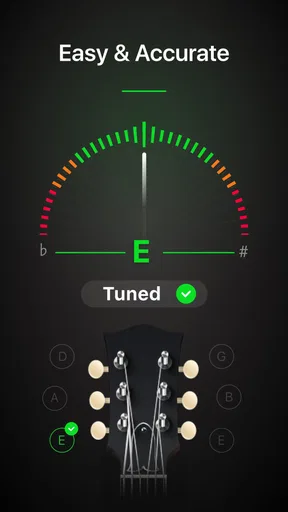
The tuning interaction is easy to understand: play one string, watch the pitch feedback, and adjust until the note settles where it should. That simple loop is the app’s strongest practical idea. I can concentrate on the instrument instead of hunting through a complicated control panel, which matters when I’m tuning between songs or helping a new player. The store age rating is Everyone, and the app is free to download, with optional in-app purchases listed from $1.99 to $89.99 per item. I’d look at the purchase screen carefully before confirming anything, especially if I’m only after basic tuning.
For a more controlled check, I’d quiet the room, pluck a string cleanly, and let its sound fade enough for the reading to settle before turning the peg again. This is more reliable than striking the string hard or brushing several strings at once, both of which can make it harder to focus on a single note. In a noisy practice space, I’d move closer to the instrument and away from other players rather than assuming a phone tuner can isolate my guitar from every surrounding sound.
Small decisions that improve a tuning session
I also make a habit of checking each string more than once. Tightening a string changes the balance of tension across the neck, so a string that seemed settled earlier can drift slightly after I tune the others. Going through the strings again is a practical way to catch that movement before playing. It takes a little longer than a single pass, but it is especially useful when I have just changed strings or am preparing an instrument that has been sitting unused.
Another useful habit is to tune in the position in which I’ll play. If I tune a guitar while it is held awkwardly and then put it into playing position, the instrument’s response can feel a little different under my hands. I don’t treat a phone’s display as a substitute for listening: once the reading looks stable, I play a familiar chord and check whether the result sounds settled to me. That final ear check keeps the app in its proper role—as a guide, not a replacement for musical judgement.
When a phone tuner is the right tool
This format is particularly convenient for beginners, casual players, and anyone who wants one less accessory to remember. If I’m at home, warming up before a lesson, or tuning a spare instrument at a friend’s place, opening a tuner on a phone is simpler than searching for a clip-on device. It can also be useful for a player who switches between guitar, ukulele, and bass and prefers to keep a general-purpose tuning tool close by.
Worth Reading Before You Choose

Flipboard Shows What News Apps Must Do Beyond the Feed

Switching to Android Auto Means Rethinking Your Driving Routine

Google Calendar Makes a Crowded Week Easier to Manage

Ludo King Makes the Most of the Minutes Between Plans

Baby Panda World Brings Quick Play to Modern Phones, but Its Game Library Feels Busy

ESPN’s Live Game View Makes Following Close Games Easier
There are situations where I’d choose something else. A clip-on tuner is often easier to read in a loud rehearsal room because it senses vibration through the instrument rather than relying on the phone’s microphone to pick out a note from the air. Onstage, a dedicated pedal tuner may fit better into a guitarist’s signal chain and offer a clear, hands-free view. A phone app wins on convenience and flexibility; it does not automatically win on visibility, noise handling, or suitability for every performance setup.
A sensible approach to control and privacy
Permissions and purchases are the points where I want to stay deliberate. I would grant microphone access when I’m ready to tune, pay attention to the device’s permission controls, and review those controls later if I no longer use the app. I would also avoid tapping through a purchase prompt without reading the amount and terms shown on the screen. These are ordinary steps, but they preserve a useful distinction: the app can be convenient without requiring me to make choices on autopilot.
For a quick tune, I don’t need to provide personal details as part of my own musical workflow; I can simply focus on the instrument and the reading. That observation is about how I use the tuner, not a claim about its broader data practices. If privacy is a deciding factor for you, check the app’s current permission details and the privacy information shown in the store and on your device before installing. I prefer that kind of direct check over guessing from an app’s purpose or assuming that every tuner handles information in the same way.
Where it sits among other tuning options
Compared with a basic standalone tuner, this app has the appeal of being available on a device I already carry. Compared with a general music-learning app, its main value is the immediate tuning task rather than a full course or structured lesson. That distinction helps set expectations: I’d open it to get an instrument ready, not expect a phone tuner alone to teach clean fretting, improve intonation, or diagnose a guitar that has a mechanical problem.
It can still be part of a useful practice routine. I might tune first, use a metronome from a separate tool if I want to work on timing, and then spend the session on a small passage rather than repeatedly checking the tuning screen. If I’m exploring unfamiliar chords, I would treat any chord reference as a starting point and listen for whether the shape fits the song. Tools are most helpful when they remove a practical obstacle without taking over the practice itself.
Who will appreciate it—and who may not
I’d recommend trying it if you are learning guitar, keep a ukulele or bass around, or regularly need a quick check before playing. The app’s stated minimum operating-system requirement is Android 6.0, and its current version is 1.39.04, so I would check compatibility on my device before relying on it. The release date is November 13, 2019, but for a day-to-day decision I care more about whether it runs on my phone and whether its controls suit the way I tune.
I would be less inclined to make it my only tuner if I often play in loud environments, need an always-visible display while performing, or prefer a physical control that works independently of a phone. It is also not the right answer if I’m looking for detailed instrument setup or a substitute for a technician: tuning helps bring strings to pitch, but it cannot fix worn strings, slipping hardware, or poor intonation. Knowing that boundary makes the app more useful, not less.
A realistic use before practice
Picture a short evening practice: I take my guitar out, settle somewhere reasonably quiet, and tune each string individually rather than strumming everything at once. I make small peg adjustments, pause for the note to register, then run through the strings a second time. Before moving on, I play a chord I know well and listen for anything that still feels off. If the room is too noisy for a steady reading, I switch to a clip-on tuner instead of spending several minutes fighting the surroundings. That is a realistic division of labor: use the app when convenience is the advantage, and change tools when the environment makes the phone less dependable.
That routine also answers a common practical concern: does a tuner app replace careful listening? I don’t think it should. It gives me a useful reference point, particularly when I’m still learning to recognize pitch, while the final check by ear helps me notice whether the whole instrument sounds right. Likewise, a quick reading is not the same as a full setup. If one string repeatedly behaves strangely, I would investigate the instrument rather than keep turning the peg and blaming the tuner.
My cautious recommendation
As an app in the music and audio category, this is best understood as a convenient pocket tool, not a promise of perfect results in every setting. MWM - AI Music and Creative Apps has made a tuner for players who want to get to the useful part—playing—with little preparation. I value that straightforward purpose, while keeping in mind that room noise, phone placement, and the instrument itself can affect how smooth a tuning session feels.
My advice is to try it for ordinary home practice or casual instrument checks, pay attention to permission and purchase prompts, and keep a clip-on or pedal tuner in mind if you regularly play around loud equipment. The app is free to start, rated for Everyone, and has optional purchases, so I would make any spending decision only after seeing what is offered in my own version. For a beginner who wants a readily available guide, that may be enough. For a gigging player who needs a dedicated, highly visible stage tool, a physical tuner is likely the more comfortable choice.
First Impressions and User Interface
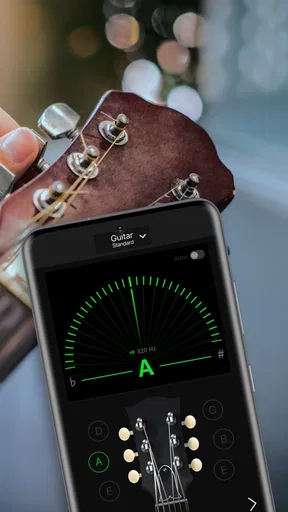
When I first downloaded Guitar Tuner Pro: Music Tuning, I was immediately impressed by its sleek and intuitive interface. The app greets you with a clean dashboard, making navigation a breeze even for the less tech-savvy among us. The buttons are big and bold, which is great because, let’s face it, no one wants to squint at their phone when they’re in the middle of a jam session.
Features That Stand Out
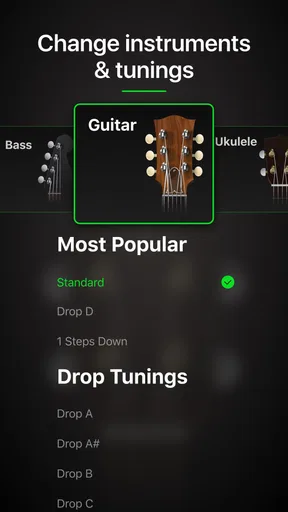
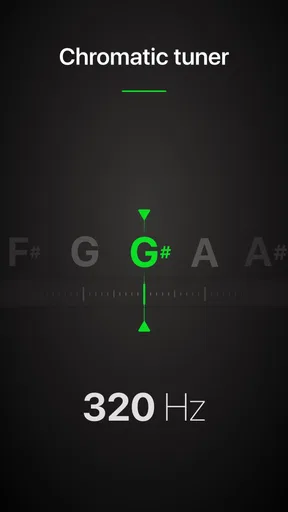
One of the standout features of this app is its versatility. It's not just a guitar tuner; it supports a wide range of string instruments, from ukuleles to violins. So if you're a multi-instrumentalist, this app has got you covered. The tuning process itself is straightforward. You simply pluck a string, and the app quickly detects the note. If you’re off-pitch, it guides you with visual cues until you’re perfectly in tune.
Another feature I love is the automatic tuning mode. For those moments when you need to tune quickly without fussing around with settings, this mode is a lifesaver. Just start playing, and the app does the rest. It’s like having a personal tuning assistant in your pocket.
Advanced Tuning Options
For the more advanced players, there’s a plethora of tuning options available. You can switch between standard and alternative tunings with just a tap. Whether you’re experimenting with drop D or open G, the app has a wide array of presets that cater to various styles. And if you fancy creating your own custom tuning, the app allows for that too. It’s these little details that make it stand out among other tuners.
Practice and Improve
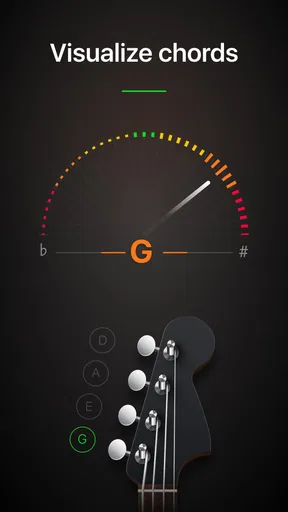
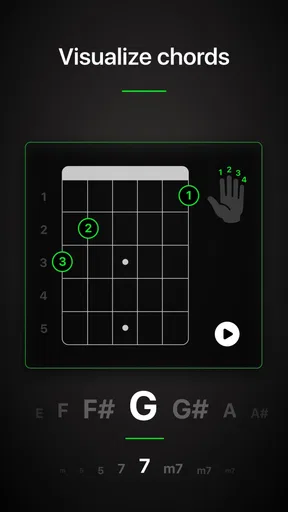
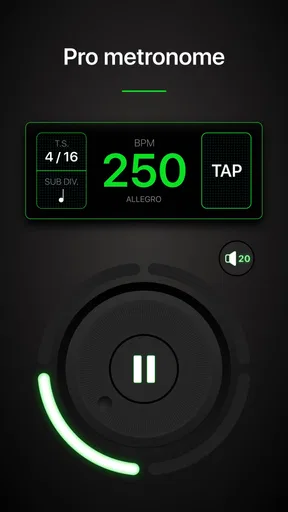
What’s really cool is that Guitar Tuner Pro: Music Tuning doesn’t stop at tuning. It also offers practice tools to help you improve your skills. There’s a built-in metronome with variable tempos, perfect for honing your timing. Plus, the chord library is extensive, offering diagrams for every chord imaginable. It’s like having a music teacher on call 24/7.
Performance and Accuracy
Now, let’s talk about performance. The app is impressively accurate, which is crucial for any tuning app. I found that it picked up even the slightest pitch deviations. This precision is especially beneficial during live performances when every note needs to be spot-on. Plus, the app is super responsive; there’s no annoying lag that can throw you off.
Final Thoughts
All in all, Guitar Tuner Pro: Music Tuning is a fantastic tool for both beginner and seasoned musicians. Its combination of user-friendly design, advanced features, and reliable accuracy makes it a must-have app for anyone serious about their music. Whether you're tuning up before a gig or just practicing at home, this app will have you sounding your best in no time. So, if you haven’t tried it yet, give it a download and see for yourself how it can elevate your musical journey.
Pros
- User-friendly interface for easy navigation.
- Wide range of tuning options for various instruments.
- Accurate pitch detection for precise tuning.
- Customizable tuning settings for personalized use.
- Offline mode available for tuning anywhere.
Cons
- Limited free features; most require premium.
- Occasional ads can disrupt tuning experience.
- Battery consumption is relatively high.
- May not support all rare instrument types.
- Initial setup can be slightly confusing.
FAQs for Guitar Tuner Pro: Music Tuning
What features does Guitar Tuner Pro offer for tuning instruments?
Guitar Tuner Pro provides a comprehensive set of features including automatic tuning, a wide range of instrument support such as guitar, ukulele, bass, and violin, and advanced tuning modes for various genres. It also offers a metronome and chord library, making it a versatile tool for musicians of all levels.
Is Guitar Tuner Pro suitable for beginners?
Yes, Guitar Tuner Pro is designed with user-friendliness in mind, making it suitable for beginners. The app provides clear visual indicators and step-by-step instructions for tuning different instruments. Additionally, the chord library and built-in tutorials offer valuable guidance for those new to playing.
Does Guitar Tuner Pro require an internet connection to function?
Guitar Tuner Pro can operate offline for tuning instruments, which is convenient for users without consistent internet access. However, some features like updating the chord library or accessing community-shared settings might require an internet connection to ensure you have the latest information and options.
How accurate is the tuning feature in Guitar Tuner Pro?
The tuning feature in Guitar Tuner Pro is highly accurate, utilizing advanced algorithms to ensure precision. Users have reported consistent results comparable to professional tuning devices. The app also provides customizable tuning settings, allowing users to fine-tune their instruments according to personal preference or specific requirements.
Are there any in-app purchases or subscriptions in Guitar Tuner Pro?
Guitar Tuner Pro offers a free version with basic functionalities. However, there are in-app purchases and subscription options available for users who want to access premium features such as advanced tuning modes, ad-free experience, and additional instrument support. This ensures flexibility for users based on their needs and budget.


